You wrote clean code, shipped real features, and have the experience the role needs — and your application still vanished without a reply. Often, the culprit isn’t your skills. It’s possible that an applicant tracking system (ATS) couldn’t read your resume properly, or didn’t find the terms it was told to look for, so a recruiter never saw it.
An ATS-friendly resume isn’t a watered-down resume. It’s one built so the software can parse every line cleanly, and a human finds it compelling once it surfaces. This guide focuses specifically on the ATS layer of a tech application: how these systems actually work, the formatting rules that keep you machine-readable, the keyword strategy that gets you ranked, and a 60-second test to confirm your resume survives the parser.
If you want the full section-by-section breakdown of what to write, start with the software engineer resume guide. This article is about making sure that the resume is seen.
What an ATS Actually Does (and What It Doesn’t)
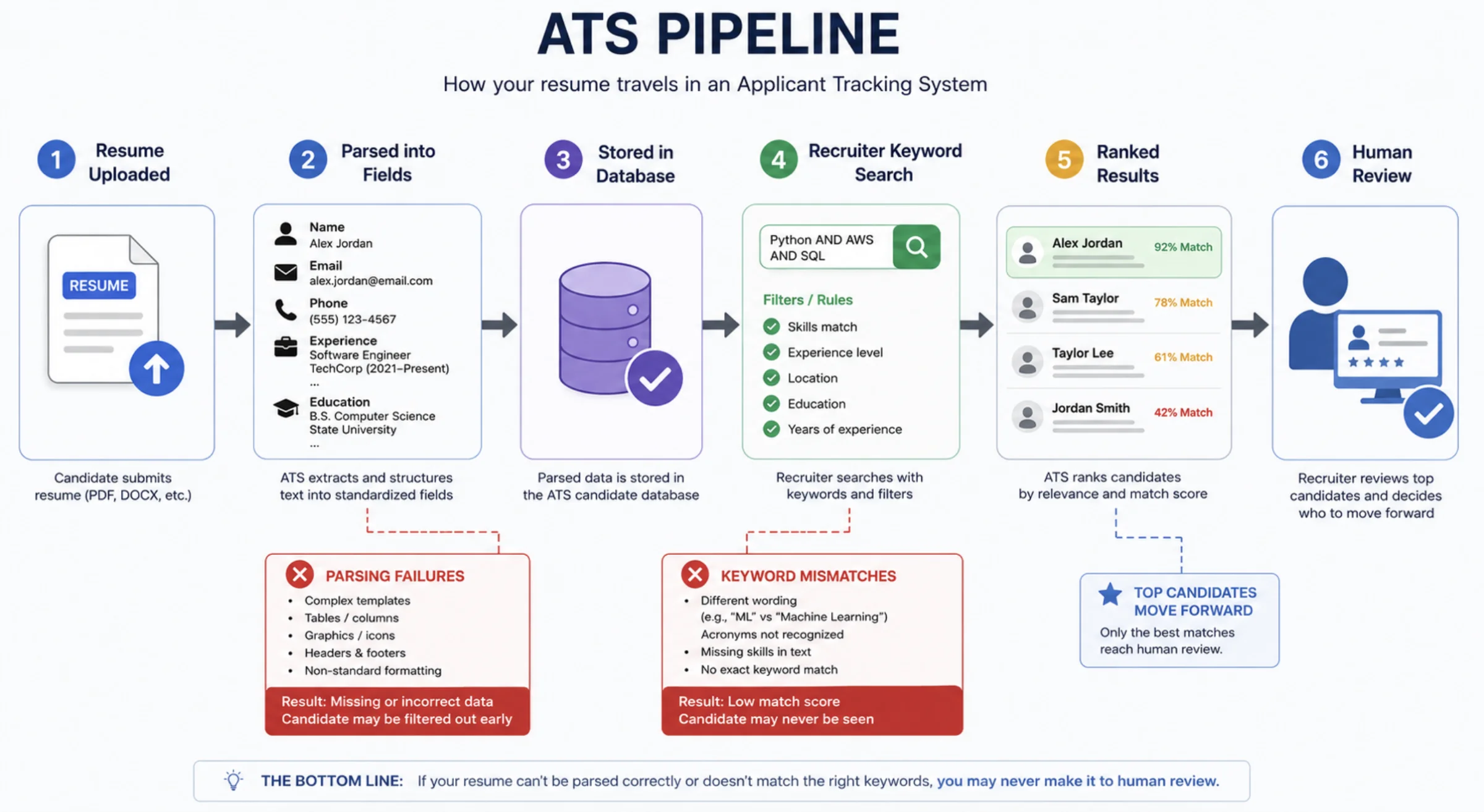
First, kill the myth. The ATS is not a robot gatekeeper that auto-rejects 75% of resumes on a whim. It’s a database. Its main jobs are to parse your resume into structured fields (name, email, work history, skills), store it so recruiters can search it, and rank candidates against a job’s keywords.
Two things actually get people filtered:
- Parsing failures. The system can’t extract your experience because the layout confuses it, so your resume gets stored as a garbled or half-empty record.
- Keyword mismatch. A recruiter searches the database for “Kubernetes” or “React,” and your resume never used the exact term, so you don’t appear in the results.
Some systems also apply knockout questions (“Do you have a work permit?”, “5+ years with Java?”). Those are answered in the application form, not parsed from your resume — answer them honestly, and they’re rarely the issue.
Key takeaway: You’re not trying to “trick the bot.” You’re making your resume trivially easy to parse and packed with the true terms a recruiter will search for. Format gets you read; keywords get you ranked.
| Audience | What it wants | How it fails you |
|---|---|---|
| The ATS parser | Clean, single-column, text-based structure | Drops or scrambles columns, tables, images, headers/footers |
| The recruiter search | Exact-match keywords from the job description | You used synonyms or acronyms it didn’t index |
| The human, finally | Impact, scope, relevant stack | Bullets list duties instead of measurable outcomes |
Tip 1: Send the Right File Format
Format is the single most common parsing failure. The safe choices:
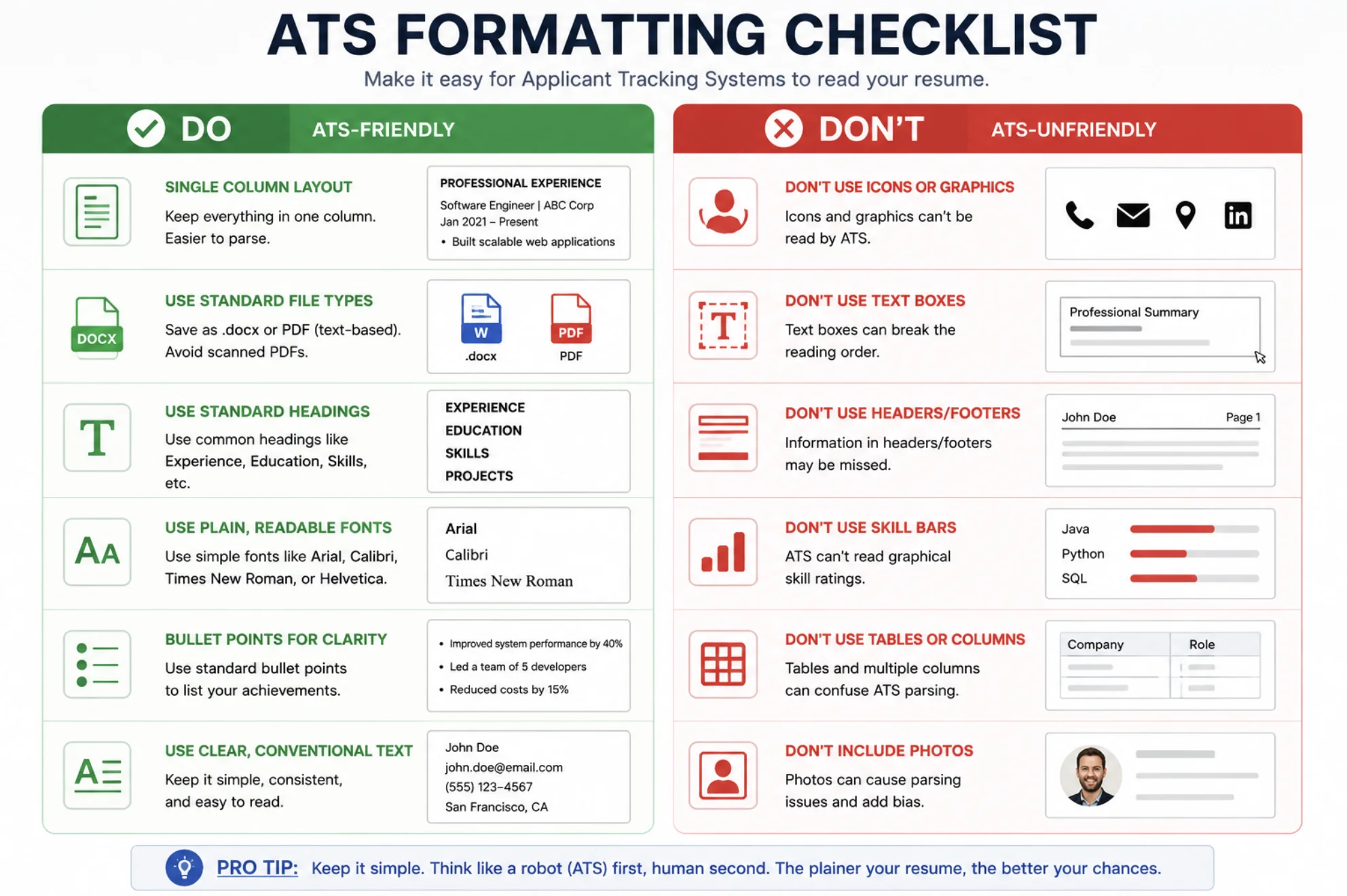
- A text-based PDF (one where you can select and copy the text) is accepted by virtually every modern ATS and preserves your layout for the human.
.docxis the most universally parseable format and the safest bet for older or unknown systems.
Avoid: .pages, image-only PDFs, scanned documents, .png/.jpg resumes, and design-tool exports that flatten text into graphics. If you can’t highlight the words with your cursor, neither can the ATS.
When the application says “upload PDF or Word,” and you don’t know the system, .docx is the most conservative choice.
Tip 2: Use a Single-Column Layout
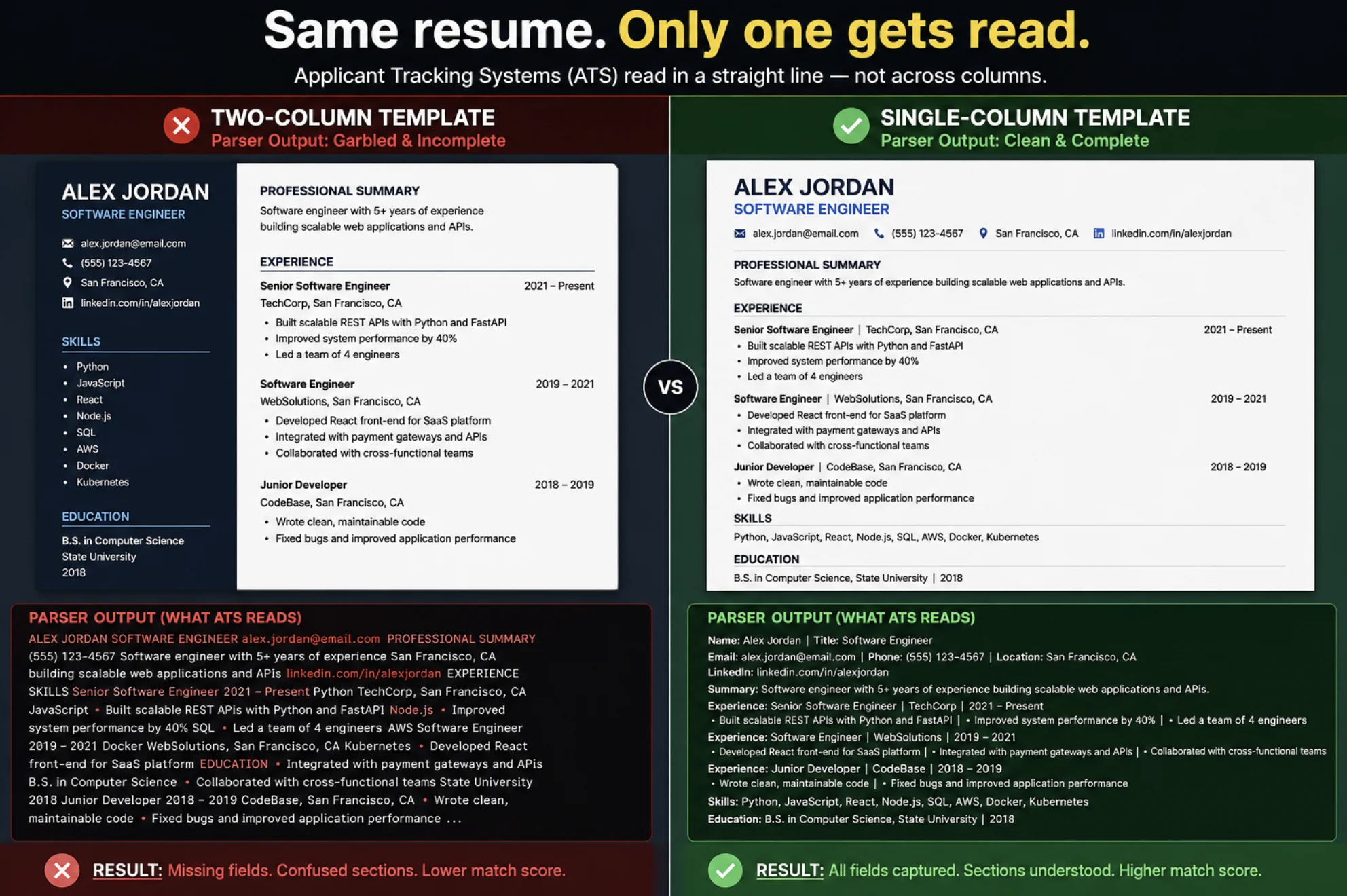
Those sleek two-column templates with a skills sidebar are the number-one cause of scrambled parsing. Many ATS engines read left to right, top to bottom, so a two-column design gets interleaved into nonsense — your job titles end up mixed with your skill list.
Stick to a single-column, top-to-bottom layout. It looks less “designed,” but it parses perfectly and reads fast during the 6–8 second human skim. For engineers, signal beats styling every time.
Tip 3: Keep Section Headings Standard
The parser maps your content to fields using your headings. Clever names break that mapping. Use the boring, expected ones:
- Work Experience (or Experience / Professional Experience)
- Skills (or Technical Skills)
- Education
- Projects
- Certifications
Skip creative labels like “Where I’ve Shipped” or “My Toolbox.” The ATS doesn’t know those map to Experience and Skills, and the cleverness costs you nothing but risk.
Tip 4: Mirror the Job Description’s Keywords
This is where you get ranked. Recruiters search the ATS database using terms straight from the job posting. Your resume needs to contain the true ones, worded the way the posting words them.
For each application:
- Read the job description and highlight the hard skills, tools, and the job title (e.g., “Python,” “AWS,” “CI/CD,” “microservices,” “Backend Engineer”).
- Make sure every term that genuinely applies to you appears in your resume — ideally in both your Skills section and, with evidence, in a bullet.
- Match the posting’s exact phrasing. If it says “CI/CD pipelines,” don’t only write “Jenkins” — include the phrase “CI/CD” so the search matches.
Key takeaway: Context beats stuffing. “Built CI/CD pipelines in GitHub Actions that cut deploy time 80%” ranks and impresses. A naked keyword list does neither — and modern ATS tools weight terms that appear inside real accomplishments.
A word of caution: never list skills you can’t defend in a technical interview, and never hide white keyword text on a white background. Recruiters and tools catch it, and it ends applications.
Tip 5: Make Your Skills Section Scannable
Group skills by category so both the parser and the human can read them in seconds. Avoid a 40-item dump — it screams padding and dilutes your real strengths.
| Category | Examples |
|---|---|
| Languages | Python, Go, TypeScript, SQL |
| Frameworks | Django, React, Node.js, FastAPI |
| Infrastructure | AWS, Docker, Kubernetes, Terraform |
| Data & Tools | PostgreSQL, Redis, Kafka, Git, CI/CD |
Use plain commas, not graphical skill bars or star ratings — those render as images or empty space to a parser, and a “3 out of 5 stars” rating actively undersells you.
Tip 6: Spell Out Acronyms — at Least Once
Recruiters search inconsistently. One types “AWS,” another types “Amazon Web Services.” If your resume only has one form, you miss the other search. Cover both by writing the term in full once, then abbreviating:
- “Amazon Web Services (AWS)”
- “Continuous Integration / Continuous Deployment (CI/CD)”
- “Software Development Life Cycle (SDLC)”
After the first mention, the acronym alone is fine.
Tip 7: Keep Dates and Job Titles Parser-Clean
The ATS builds your career timeline from your work history, so make it unambiguous:
- Use a consistent date format throughout —
MM/YYYY(e.g., 03/2022 – Present) is the safest. - Put the company, job title, and dates on their own clear lines, not buried in a sentence.
- Use standard, recognizable job titles. If your internal title was “Code Ninja,” list “Software Engineer (Code Ninja)” so both the search and the human understand it.
Avoid putting dates in a separate column or text box — that’s exactly the kind of element parsers drop.
Tip 8: Ditch Graphics, Icons, Tables, and Text Boxes
Anything that isn’t plain text in the normal document flow is a parsing risk:
- Images, logos, headshots, and icons are invisible to the parser (and headshots are discouraged on US/Canada resumes regardless).
- Tables and multi-column grids for critical info often get flattened or reordered. (A clean Skills table usually survives, but never put your experience in a table.)
- Text boxes are frequently skipped entirely — never put contact details or anything important inside one.
- Headers and footers are unreliably parsed in many systems; keep your name, email, and phone in the main body of the document, at the top.
Tip 9: Pick a Boring, Readable Font
Use a standard, embedded font: Calibri, Arial, Helvetica, Georgia, Garamond, or Times New Roman. Decorative or obscure fonts can fail to embed in a PDF and render as gibberish. Keep body text at 10–12pt. This is one place where boring is a feature.
Tip 10: Don’t Bury Contact Info or Links
The parser pulls your name, email, and phone into key fields — make them dead simple to find on the first line(s) of the body. Then include the links that matter for engineers:
- A customized LinkedIn URL
- Your GitHub and/or a developer portfolio link
Write URLs as plain, visible text (github.com/yourname), not hidden behind an icon. A live link to clean, documented code is one of the strongest signals you can give — and unlike a buzzword, it’s verifiable.
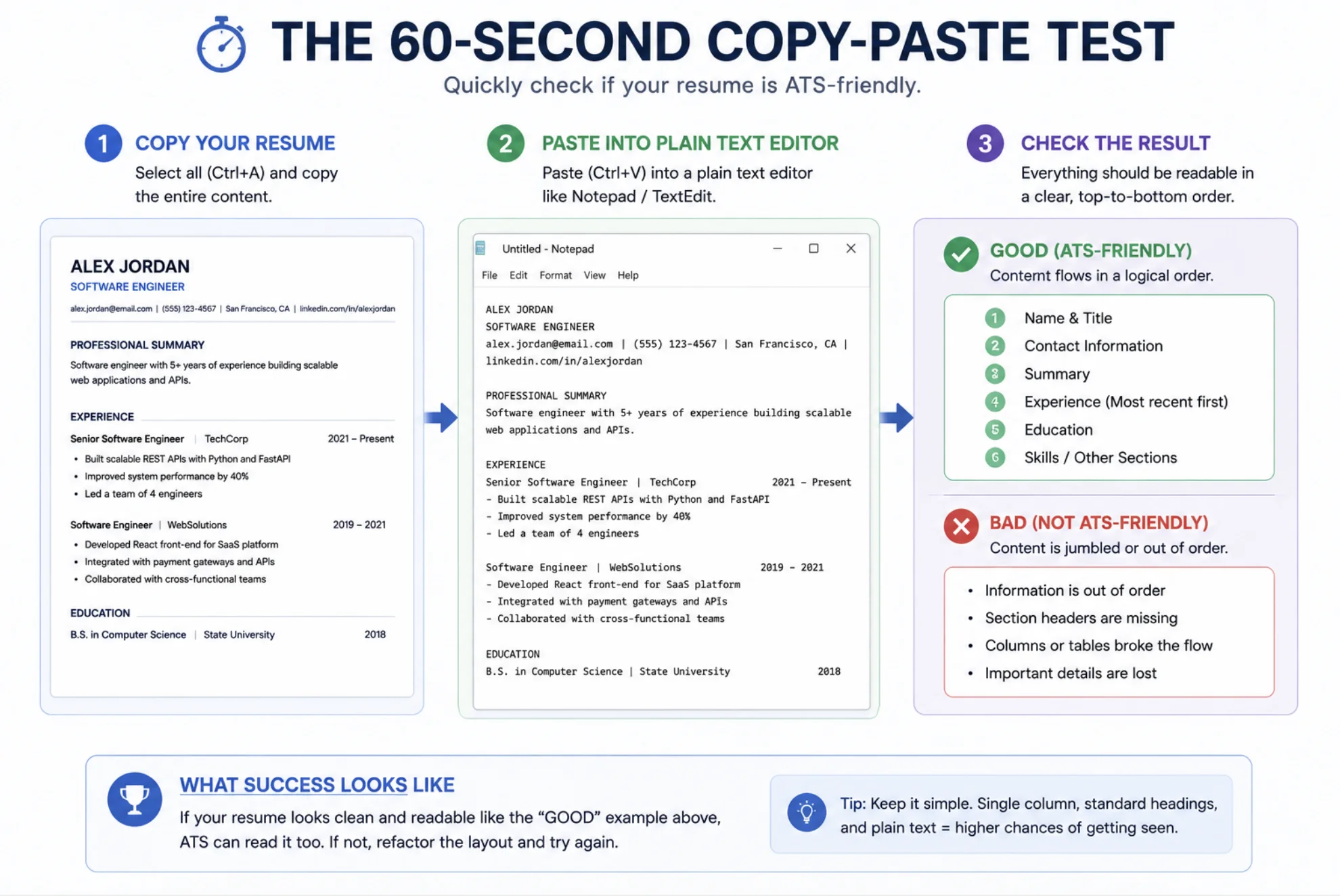
How to Test Your Resume in 60 Seconds
You don’t need to guess whether your resume parses. Run these checks before every batch of applications:
- The copy-paste test. Open your resume, select all, copy, and paste it into a plain text editor (Notepad, TextEdit in plain-text mode). If the result is jumbled, out of order, or missing sections, the ATS sees the same mess. Fix the layout until the plain text reads top-to-bottom in the right order.
- The read-aloud / screen-reader sanity check. If a screen reader would announce your content in a sensible order, a parser likely reads it that way too.
- An ATS checker. Tools like Jobscan compare your resume against a specific job description and score keyword and formatting match. Use them as a guide, not gospel — a high score with weak, duty-based bullets still won’t win the human.
Key takeaway: The copy-paste test is free, takes a minute, and catches the majority of parsing problems. Do it every time you change templates.
ATS Myths That Waste Your Time
- “Bots reject 75% of resumes automatically.” No. Most are stored and surfaced via recruiter search. You lose to bad parsing and missing keywords, not an auto-reject button.
- “Stuffing invisible keywords gets me ranked.” It gets you caught. White-on-white text and keyword spam are flagged by tools and recruiters alike.
- “PDFs always get rejected.” False for modern systems — a text-based PDF is fine almost everywhere. Image-only PDFs are the real problem.
- “More keywords = better.” Relevance and context win. Ten terms backed by accomplishments beat fifty in a list.
- “One resume works for every job.” The opposite. Tailoring keywords per posting is the highest-leverage thing you can do.
Remember: The Human Is the Real Reader
Passing the ATS only earns you the next gatekeeper — a recruiter who skims for 6–8 seconds. So every ATS-friendly choice should also serve the human:
- Lead bullets with impact and metrics, not duties (“Cut p99 latency 40% by adding Redis caching,” not “Responsible for performance”).
- Keep it to one page unless you have 8+ years of relevant experience.
- Show scope and ownership, not a tech-stack word cloud.
FAQ
What is an ATS-friendly resume?
It’s a resume formatted so an applicant tracking system can parse every section cleanly and rank it against a job’s keywords — typically a single-column, text-based document with standard headings, a readable font, no images or text boxes, and keywords that mirror the job description. The goal is to be both machine-readable and compelling to the human who reads it next.
Is PDF or Word better for an ATS?
A text-based PDF (one where you can select the text) is accepted by virtually all modern systems and preserves your layout. .docx is the most universally parseable format and the safest choice when you don’t know which system you’re applying through. Avoid image-only PDFs, scanned files, and design-tool exports that flatten text into graphics.
How many keywords should I put on my resume?
There’s no magic number — include every skill and tool from the job description that genuinely applies to you, worded the way the posting words them, and placed inside real accomplishments rather than a long list. Relevance and context matter far more than volume, and keyword stuffing is penalized.
Do ATS systems reject resumes automatically?
Rarely, and not in the way people fear. Most systems store your resume and surface it through recruiter keyword searches; you usually lose out to poor parsing or missing keywords, not an automatic reject. Application-form knockout questions (work authorization, minimum experience) are the main true auto-filters — answer them honestly.
How do I test if my resume is ATS-friendly?
Copy your resume and paste it into a plain text editor. If the text comes out jumbled, out of order, or missing sections, the parser sees the same thing and you need to simplify the layout. You can also run it through an ATS checker like Jobscan against a specific job posting to gauge keyword and formatting match.
Can I use a two-column resume template?
It’s risky. Many ATS parsers read left to right and interleave the two columns into scrambled text. A single-column, top-to-bottom layout parses reliably and reads just as fast for a human. If you love a sidebar design, keep a single-column version specifically for online applications.
Conclusion
An ATS-friendly software engineer resume isn’t about gaming software — it’s about removing every reason a parser or a recruiter might miss what you’ve actually done. Send a text-based file, keep the layout single-column with standard headings, mirror the job description’s true keywords inside real accomplishments, cut the graphics and text boxes, and run the copy-paste test before you apply.
Do that and your resume clears the machine layer reliably — which finally lets the part that matters do its job: proving, in seconds, that you deliver results in the stack the team needs.