Social sharing buttons remain one of the simplest ways to drive organic traffic to your WordPress site. When a visitor clicks that share button, your content reaches their entire network for free. But with dozens of plugins competing for your attention, picking the right one can waste hours you could spend writing.
We tested and compared the most popular free social media sharing plugins for WordPress to help you decide. Every plugin on this list is genuinely free (no paywalled core features), lightweight enough for production sites, and actively maintained in 2026. Whether you run a personal blog, a niche content site, or a WooCommerce store, there is an option here that fits.
What to Look for in a Free Social Sharing Plugin
Before jumping into the list, it helps to know what separates a good free social media sharing plugin for WordPress from a mediocre one. You want a plugin that loads fast, since every extra HTTP request or external script slows your pages and hurts Core Web Vitals. You want one that stores data locally instead of phoning home to a third-party API. And you want one that actually looks good on your site without hours of CSS overrides.
Pay attention to where the share counts come from. Some plugins rely on third-party count APIs that break without notice. Others store counts in your own database, giving you full control. Also consider whether the plugin supports modern sharing destinations, not just the legacy networks, but newer ones your audience actually uses in 2026, including AI assistants like ChatGPT and Claude.
The 7 Best Free Social Media Sharing Plugins for WordPress
SmartShare (Social Share WP)
The only free WordPress social sharing plugin with built-in AI assistant buttons.
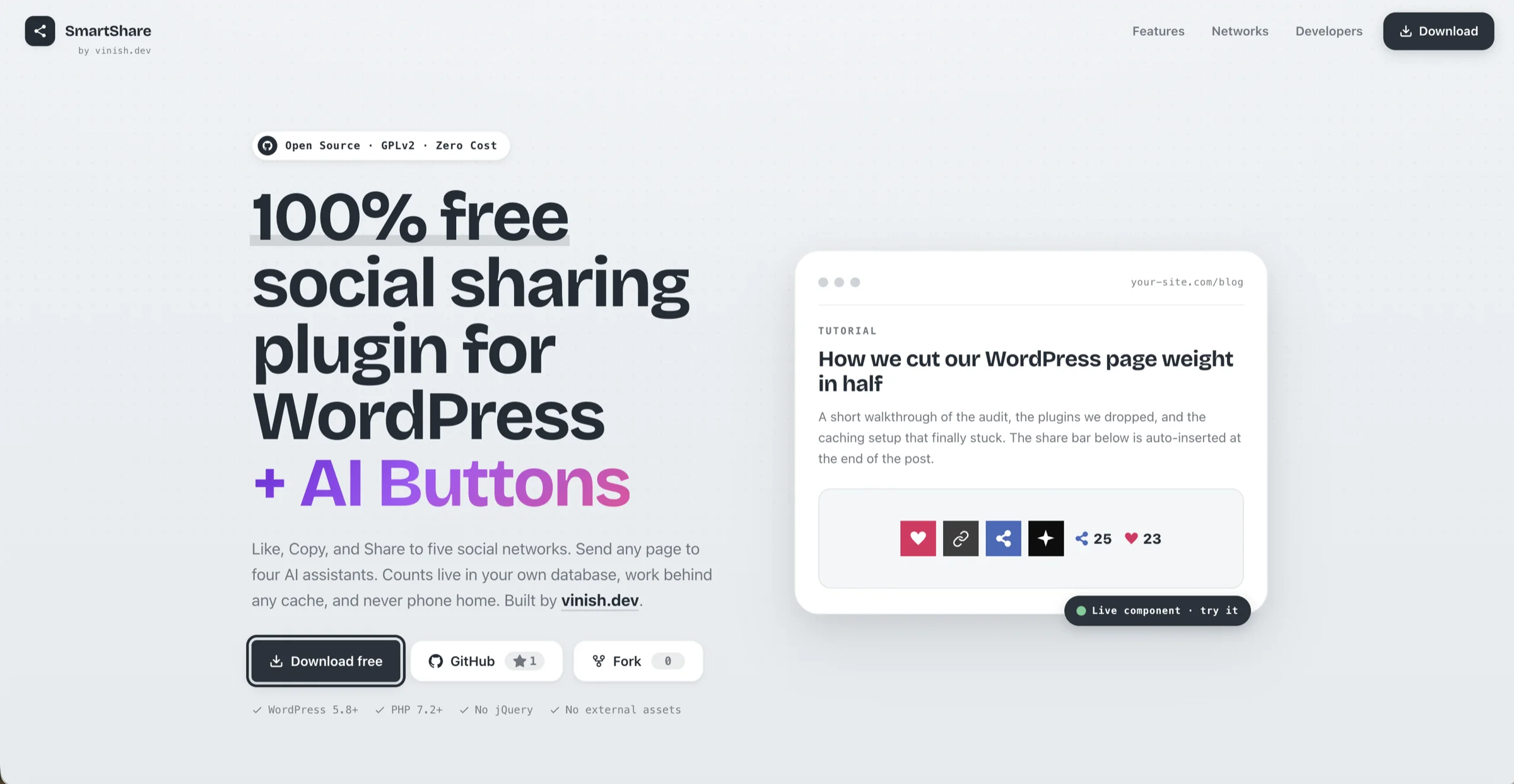
SmartShare is a free, open-source social sharing plugin built by vinish.dev. It stands out from every other plugin on this list for one reason: it includes AI assistant hand-off buttons alongside traditional social share buttons. Your readers can send any page to ChatGPT, Claude, Gemini, or Grok with a single click and a customizable prompt. No other free plugin does this.
Beyond the AI angle, SmartShare nails the fundamentals. It ships with 11 buttons across four groups: a dedicated Like button, a Copy Link button, five social networks (Facebook, X, Pinterest, LinkedIn, and Reddit), and four AI assistants. All share counts are stored locally in your own wp_sswp_counts table. A server-side per-IP throttle prevents scripted count inflation, and a POST-based counting endpoint means your page cache or CDN never serves stale numbers.
The plugin comes with two layouts: a horizontal bar that sits inside your post content and a vertical sticky bar that floats beside it. Both are clean, modern, and require zero custom CSS to look professional. The hover interaction is thoughtfully designed. The main bar stays compact, and hovering on “Share” or “Ask AI” reveals the full set of options without cluttering your page.
On the performance side, SmartShare loads a single small CSS file and a single deferred JavaScript file. No jQuery dependency, no external fonts, no icon library CDN calls, no external assets of any kind. It is one of the lightest social sharing plugins you can install.
- Only plugin with native AI assistant buttons
- Truly zero external requests
- Local counts survive API shutdowns
- Clean, modern default styling
- Extremely lightweight
- Newer plugin, smaller community so far
- 5 social networks (vs. 100+ on some competitors)
- No built-in follow buttons
AddToAny Share Buttons
The most popular free share button plugin on WordPress.org with 300K+ active installs.
AddToAny has been around since 2006 and is the most widely installed free social sharing plugin for WordPress. It supports over 100 social networks and messaging apps, including Facebook, X, Bluesky, Mastodon, WhatsApp, Pinterest, LinkedIn, Threads, Reddit, and many more. If you need broad network coverage without paying a cent, AddToAny is hard to beat.
The plugin loads asynchronously, which helps with page speed. It offers both standard and floating share bar placements, supports custom post types, and integrates with Google Analytics for tracking shared links. The admin interface is refreshingly free of upsells. There is no premium tier, no Pro tab, and no welcome wizard demanding an account. You install it, activate it, and share buttons appear at the bottom of every post immediately.
On the downside, AddToAny relies on its external JavaScript platform for the universal share menu and count retrieval, so it is not fully self-contained the way SmartShare is. The default button styling also looks utilitarian compared to newer competitors, though you can override it with custom CSS or custom icon URLs.
- 100+ supported networks
- Truly free, no premium tier
- AMP support built in
- Largest install base, battle-tested
- Loads external JavaScript from AddToAny CDN
- No AI assistant buttons
- Default design feels dated
Sassy Social Share
Deep free customization with 100+ networks and SVG vector icons.
Sassy Social Share by Team Heateor is one of the most customizable free social sharing plugins available. It supports over 110 social sharing and bookmarking services, uses scalable SVG vector icons that look crisp on retina displays, and runs entirely on your server without communicating with any external API.
The free version includes icon shape customization, size adjustments, color overrides, floating sidebar placement, mobile-responsive breakpoints, and share count display for supported networks including X, Pinterest, Reddit, and others. It also works with WooCommerce product pages, BuddyPress, and BBPress.
However, there is a concern worth noting. The Heateor brand website has been reported as parked in recent reviews, which raises questions about long-term maintenance. The plugin itself continues to receive updates on WordPress.org, but if vendor stability matters to you, keep this in mind.
- 110+ sharing services in the free tier
- Extensive icon customization for free
- No external API calls
- WooCommerce compatible
- Vendor website status uncertain
- Admin UI can feel overwhelming
- No AI assistant integration
Social Snap
Feature-rich sharing with social login and engagement analytics.
Social Snap takes a broader approach than a pure share-button plugin. The free version gives you customizable social sharing icons that you can place anywhere on your site, plus social login so visitors can authenticate with their social accounts. The plugin is lightweight, responsive, and quick to set up.
Where Social Snap really shines is its premium tier, which includes auto-scheduling, old post revival, and advanced analytics. The free version is more limited but still a solid choice if you plan to upgrade later. The share buttons are clean and modern out of the box, and the plugin handles click-to-tweet boxes, social meta tags, and content locking in the paid version.
- Modern, polished button design
- Social login in free tier
- Good upgrade path to premium
- Best features are paid
- Fewer networks than AddToAny or Sassy
- No local share count storage
Social Warfare
Performance-focused sharing with Pinterest-optimized image features.
Social Warfare is designed for content creators who take social traffic seriously. The free version provides share buttons for the major networks with share count recovery, which means if you switch from another plugin, you do not lose your existing counts. It is also one of the few plugins that lets you set Pinterest-specific images and descriptions per post, which is a big deal for sites that rely on Pinterest traffic.
The plugin prioritizes performance, loading only the assets needed on each page. It has a clean admin interface and offers solid documentation. The premium version adds UTM tracking, popular posts widgets, and additional networks, but the free tier covers the essentials well.
- Share count recovery on migration
- Pinterest-specific image options
- Performance-conscious asset loading
- Free version is fairly basic
- Development pace has slowed
- No floating sidebar in free tier
Shareaholic
All-in-one sharing, related content, and analytics in a single platform.
Shareaholic bundles social sharing buttons with related content recommendations, social analytics, and optional monetization tools. If you want a single plugin to handle sharing and content discovery together, it is one of the more polished options available.
The share buttons support a wide range of networks and come with multiple visual styles that look more polished than the default native buttons on most platforms. The analytics dashboard shows you which content gets shared the most and on which networks, helping you tailor your content strategy.
The tradeoff is that Shareaholic operates as a platform, meaning your site communicates with Shareaholic servers. If you prefer a fully self-contained plugin with no external dependencies, SmartShare or Sassy Social Share are better fits.
- Related content recommendations built in
- Social analytics dashboard
- Multiple button design styles
- Communicates with external Shareaholic servers
- Heavier page weight than simpler plugins
- Account required
Social Media Share Buttons & Social Sharing Icons
Combine share buttons, follow icons, email opt-ins, and pop-ups in one plugin.
This plugin (often referred to by its long name) is a two-in-one solution that lets you add both share buttons and follow icons for over 200 platforms. The free version includes 16 icon design sets, animations, sticky or floating icon placement, share counts, and pop-up prompts.
One standout feature in the free tier is email subscriber integration, letting you combine social sharing with list building without installing a separate plugin. The downside is that all those options can make the settings page feel cluttered, and the sheer number of animation and pop-up options can lead to a busy, distracting user experience if you are not careful with configuration.
- 200+ platforms supported
- Email opt-in integration
- 16 free icon design sets
- Settings page is overwhelming
- Animations can feel intrusive
- Premium push for best features
Quick Comparison Table
Here is a side-by-side look at the key differences between all seven plugins covered in this article.
| Plugin | Networks | AI Buttons | Local Counts | External Requests | Price |
|---|---|---|---|---|---|
| SmartShare | 5 + 4 AI | Yes | Yes | Zero | Free (GPLv2) |
| AddToAny | 100+ | No | No | Yes (CDN) | Free |
| Sassy Social Share | 110+ | No | No | No | Free |
| Social Snap | 30+ | No | No | Yes | Freemium |
| Social Warfare | 6 (free) | No | No | Yes | Freemium |
| Shareaholic | 40+ | No | No | Yes (platform) | Freemium |
| Share Buttons & Icons | 200+ | No | No | Yes | Freemium |
How to Choose the Right Free Social Sharing Plugin
Your choice depends on what matters most to your site. If you value privacy, performance, and future-readiness with AI integration, SmartShare is the clear winner. It makes zero external requests, stores everything locally, and is the only plugin in this category that lets readers hand off your content to AI assistants directly.
If you need to support niche or regional social networks (VKontakte, Xing, Line, WeChat), AddToAny or Sassy Social Share give you the broadest coverage. If you want related-content recommendations bundled with sharing, Shareaholic is worth a look. And if you need a stepping stone to a full-featured premium suite, Social Snap offers the smoothest upgrade path.
For most WordPress site owners publishing content in 2026, we recommend starting with SmartShare. It covers the five networks that drive the vast majority of social referral traffic, adds a feature no competitor has (AI buttons), and does it all with the smallest possible footprint. You can always add a second plugin later if you need more networks.
Try SmartShare on Your WordPress Site
Free, open source, and built for performance. Download and install it in under a minute.
Get SmartShare Free →Frequently Asked Questions
SmartShare (Social Share WP) is our top pick for 2026. It is completely free, open source, makes zero external requests, stores share counts locally, and is the only free plugin that includes AI assistant hand-off buttons for ChatGPT, Claude, Gemini, and Grok.
They can, but it depends on the plugin. Plugins that load external scripts, icon font libraries, or jQuery add extra weight. Lightweight plugins like SmartShare and AddToAny minimize performance impact by deferring JavaScript and avoiding unnecessary dependencies.
Third-party count APIs have become less reliable as platforms restrict access. Plugins that store counts in your own WordPress database, like SmartShare does, give you the most reliable and persistent share counts because they do not depend on external APIs.
AI buttons let your readers send your page URL to an AI assistant (like ChatGPT or Claude) with a pre-filled prompt. The assistant then summarizes or analyzes the content. This is a new sharing paradigm that SmartShare pioneered for WordPress, giving readers a way to engage with your content beyond traditional social networks.
Technically yes, but it is not recommended. Multiple sharing plugins can cause duplicate buttons, conflicting JavaScript, and slower page loads. Pick one that covers your needs and stick with it.
Final Verdict
The free social media sharing plugin landscape for WordPress has not changed dramatically in years. Most plugins still do the same thing: show a row of social buttons and call it a day. SmartShare breaks that pattern by adding AI assistant buttons, storing share counts locally, and eliminating all external dependencies, while staying completely free and open source.
If sheer network volume is your priority, AddToAny and Sassy Social Share remain excellent choices. But if you want a modern, forward-looking plugin that reflects how people actually consume content in 2026 (sharing to both social networks and AI tools), SmartShare is the plugin to install.