Let’s face it—email spam is getting out of control. Just last week, I sorted through my personal inbox and found no fewer than 12 emails claiming I’d won contests I never entered and another 8 urgently requesting that I “verify my account” for services I don’t even use. Sound familiar?
The days of obvious Nigerian prince scams are long gone. Today’s spam is sophisticated, targeted, and increasingly difficult to spot. That’s exactly why I’ve become a big fan of using an email spam checker online—and why I think you should too.
Why Your Regular Spam Filter Isn’t Cutting It
Most email providers have basic spam filtering, sure. But if you’re reading this, you’ve probably noticed plenty of suspicious messages still sneak through. That’s because the people creating spam are constantly adapting their tactics to evade standard filters.
According to recent research, about 85% of all email traffic worldwide is spam. That’s absolutely staggering when you think about it. And it’s not just annoying—some of these messages carry phishing attempts, malware, or sophisticated scams designed to separate you from your money or personal information.
What Exactly Is an Email Spam Checker?
Before I dive into the specific tool I recommend, let’s clarify what we’re talking about. An email spam checker online is essentially a dedicated tool that analyzes suspicious emails to determine if they’re legitimate or potentially harmful.
Unlike the default filters built into Gmail or Outlook, specialized spam checkers dig deeper into the content, examining everything from the sender’s address to the specific language patterns used in the message body.
The Free Email Spam Checker That Actually Works
I’ve tried several options out there, but there’s one free online email spam checker that stands out from the crowd. It uses AI technology (specifically the GPT-4o model) to analyze emails much like a cybersecurity expert would.
What I particularly appreciate is that it’s completely free to use—no registration, no credit card, no “premium tier” bait-and-switch tactics. In a world where everything seems to require yet another monthly subscription, that’s refreshingly straightforward.
How to Check If That Suspicious Email Is Spam
Using this tool couldn’t be simpler. Here’s how to get started:
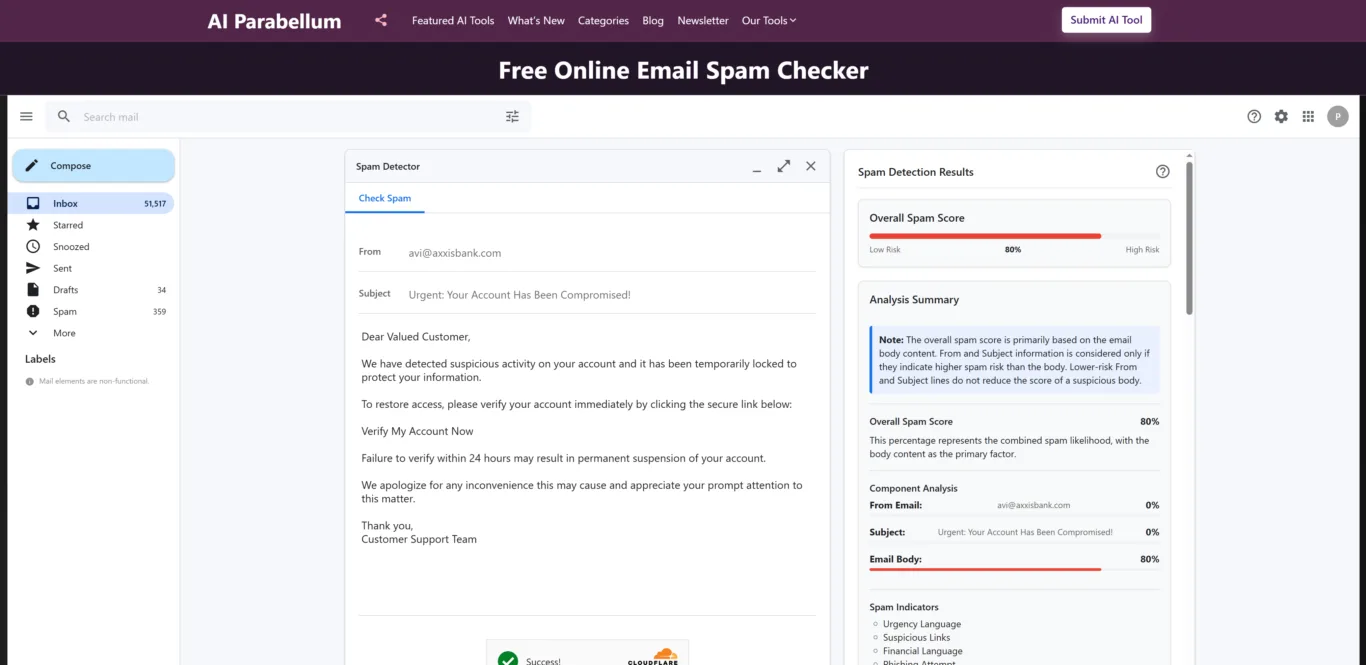
First, copy over the components of the suspicious email:
- The sender’s address (who it’s from)
- The subject line
- The email body text (this part is required)
The tool does ask you to complete a quick CAPTCHA verification—a minor inconvenience that’s actually a good thing, as it prevents bots from abusing the system.
Once you’ve entered the email details and verified the CAPTCHA, just hit the “Check Spam” button. Within seconds (and I mean literally seconds—I timed it), you’ll get a detailed breakdown of whether the email is likely legitimate or spam.
What Makes This Spam Checker Different
Having tested dozens of security tools over the years, I’ve become pretty skeptical of grand claims. But this particular free email spam checker online impressed me with several standout features:
It Analyzes Each Part of the Email Separately
Rather than just giving the email a simple yes/no verdict, the tool breaks down its analysis by component. It evaluates the sender address, subject line, and email body individually, which helps catch those sneaky emails where only one element looks suspicious.
Smart Scoring That Actually Makes Sense
One thing that drives me crazy about some security tools is that they don’t explain their reasoning. This one does. It focuses primarily on the email body (which typically contains the most revealing information) but will increase the overall spam score if the sender address or subject line looks particularly suspicious.
What I find particularly clever is that it won’t decrease the spam score if the subject line seems innocent but the body contains red flags. This prevents those “wolf in sheep’s clothing” emails from slipping through.
You Actually Learn Something
Beyond just telling you if an email is spam, the tool explains why it reached that conclusion. It identifies specific spam indicators like urgency language (“Act now!”), suspicious links, unusual sender patterns, and more.
This educational aspect has actually helped me become better at spotting spam on my own. After using the tool for a while, I’ve started noticing patterns I wouldn’t have picked up otherwise.
Real-World Benefits I’ve Noticed
Peace of Mind When Something Seems Off
We’ve all had that moment—an email from your bank that just doesn’t feel quite right. Instead of agonizing over whether to click that link, I now just run it through the spam checker. Five seconds later, I know whether to proceed or delete.
Time Saved Sorting Through Email
I used to waste at least 15 minutes daily sorting through borderline spam. Now I can quickly check anything suspicious and move on with my day. Those minutes add up!
It Caught Phishing Attempts My Regular Filter Missed
Just last month, I received what looked like a legitimate Amazon order confirmation. My regular spam filter let it through, but something seemed off about the sender address. The free online email spam checker immediately flagged it as high-risk, pointing out subtle issues I hadn’t noticed. Sure enough, it was a sophisticated phishing attempt.
Who Should Be Using This Tool?
In my opinion, this free email spam checker online is valuable for pretty much anyone with an email address, but especially:
- Anyone who handles sensitive information or financial details via email
- Small business owners who can’t afford enterprise-level security solutions
- Less tech-savvy friends and family members (I actually set it up for my mom, who was constantly clicking on suspicious links)
- People who receive high volumes of email and need to quickly sort legitimate messages from junk
Making Email Spam Checking Part of Your Routine
If you’re serious about protecting your inbox (and by extension, your personal information), here’s what I suggest:
- Bookmark the spam checker for easy access
- Get in the habit of verifying any email asking you to click a link, download an attachment, or provide personal information
- If you’re really not sure about an email, check it before opening it at all
- Use what you learn from each analysis to sharpen your own spam-detection skills
One tip I’ve found useful: if you’re on a desktop computer, keep the free email spam checker open in a separate browser tab during your “email time” for quick checking.
Final Thoughts
Look, no security tool is perfect. Even the best free online email spam checker won’t catch 100% of threats. But in my experience, adding this extra layer of protection makes a significant difference in keeping unwanted and potentially harmful content out of your inbox.
What I appreciate most about this particular tool is its combination of advanced analysis and straightforward usability. You don’t need to be a cybersecurity expert to understand the results, but you’re getting the benefit of sophisticated AI-powered analysis that goes far beyond basic filtering.
The fact that it’s completely free to use makes it a no-brainer addition to your digital security toolkit. In a world where online threats are constantly evolving, taking advantage of free, effective protection just makes sense.
So the next time you receive a suspicious email—and trust me, you will—take 30 seconds to run it through this free email spam checker online. Your digital security is worth that small investment of time.