Nobody plans to manage three hundred proxies. You start with five, pasted into a notes file. Then a project needs a second country, a colleague sends over another batch, and a vendor exports in a slightly different format.
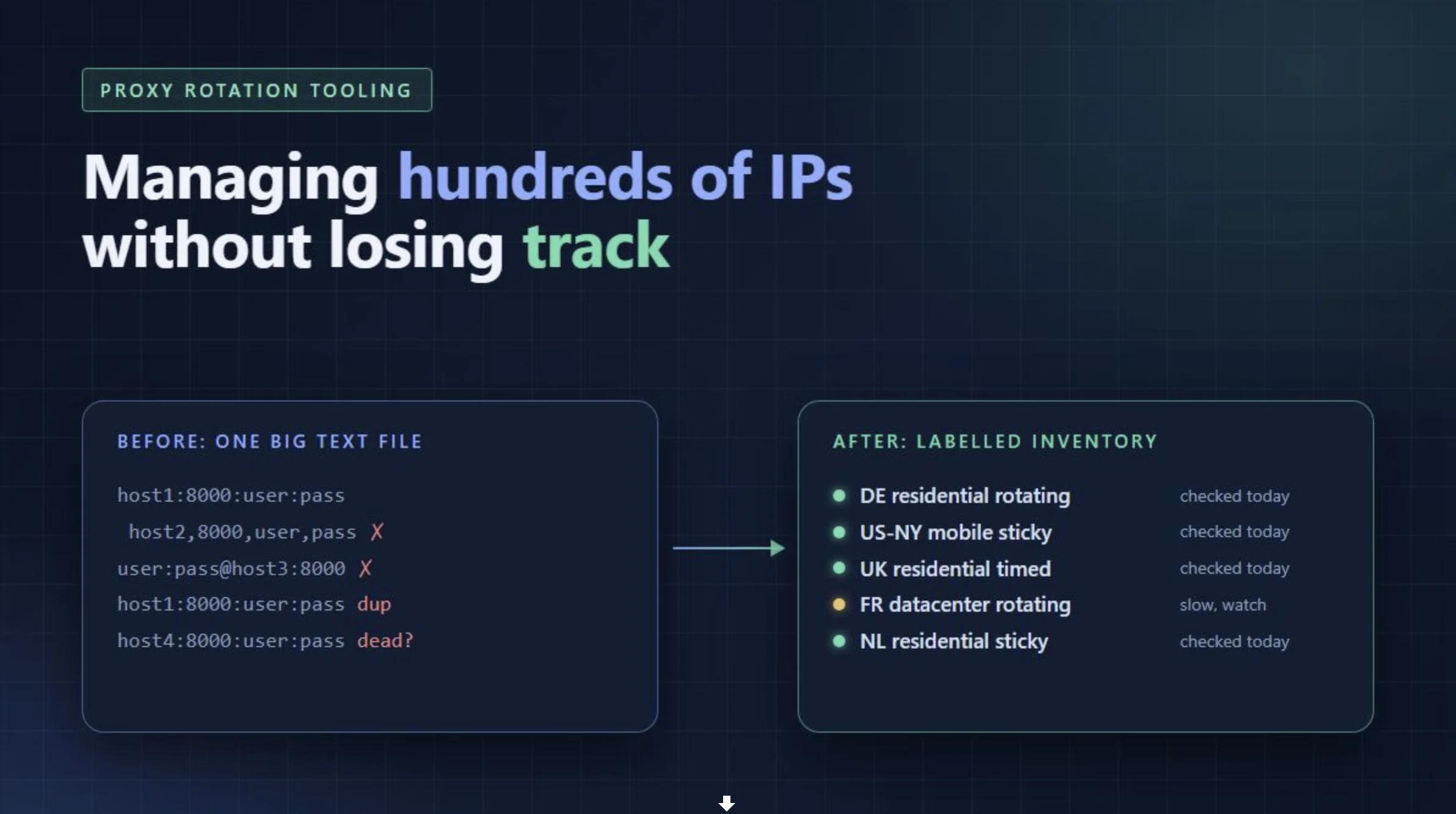
A few months later you have a text file nobody wants to open. Some lines use colons, some use commas, and a few still carry spaces from an email. Half the entries might be dead, and nobody can tell which ones.
This guide is about getting out of that state and staying out. It covers cleaning and organising a large proxy list and how rotation works at scale. It also looks at the tools that take the manual work off your plate.
First, work out which kind of “hundreds of IPs” you have
Two very different setups hide behind the same phrase. The right tooling depends on which one you’re in.
- A list of individual proxies. Each line is a separate endpoint with its own host, port and credentials. If you want rotation, your own software has to choose the next line, spot failures and skip dead entries.
- A rotating gateway. You connect to one address, and the provider picks an exit IP from a large pool for you. Rotation, retiring bad IPs and spreading load all happen on the provider’s side.
Plenty of teams run both. They might keep a short list of fixed IPs for one job and send everything else through a gateway. The point is to know which parts of the work are yours, because that’s where tooling earns its keep.
With a static list, the hard parts are hygiene, health checks and rotation logic. With a gateway, the list is short but each entry carries more meaning. On many gateways, targeting and session settings live inside the username, so one account can produce dozens of variants. Keeping those variants organised becomes the job.
Clean the list before you do anything clever
Rotation built on a messy list just rotates the mess. Spend an hour on cleanup first and everything after it gets easier.
Start by picking one format and converting everything to it. The most common layout is host:port:user:pass, one proxy per line, and most tools can import it. Whatever you choose, use it everywhere, including in files you hand to colleagues.
Then work through the usual problems:
- Stray whitespace. Leading spaces, trailing tabs and Windows line endings break more imports than almost anything else. Trim every line.
- Mixed delimiters. A find-and-replace pass handles most delimiter differences, such as commas or semicolons instead of colons. Lines in a user:pass@host:port layout need reordering, so convert those separately.
- Duplicates. Sort the list and remove repeated lines. Duplicates quietly skew any rotation that cycles through entries in order.
- Blank and comment lines. Remove them before import, since some tools treat every line as a proxy.
You don’t need special software for any of this. Free browser-based text tools handle trimming, sorting, deduplication and find-and-replace in seconds. One caution, though: a proxy list with passwords is a credential file. Before pasting it anywhere, check that the tool works locally in your browser, or use a copy with the passwords masked.
Give every proxy a name and a few facts
Once a list passes a hundred lines, the bare connection string isn’t enough. You need to know what each entry is for without testing it.
The simplest fix is moving from a text file to a CSV with a few extra columns. A layout that works for most teams looks like this:
- Label. A short, readable name such as “DE residential rotating” or “US-NY mobile sticky”.
- Type. Residential, mobile or datacenter, since sites can treat each one differently.
- Location. Country first, then region or city if the entry is targeted that tightly.
- Session mode. Rotating per request, sticky, or rotating on a timer.
- Owner and project. Who uses it, and for what, so nobody deletes something another team depends on.
- Last checked. The date of the last successful health check.
Spreadsheet software opens this comfortably at a few hundred rows. At a few thousand, a dedicated CSV viewer is easier to work with. Converting the file to JSON also makes it simple to feed into scripts.
The format matters less than the habit: one source of truth, updated whenever something changes. Names deserve more care than people give them, too. “Profile 3” means nothing six weeks later. “UK mobile sticky, pricing project” tells anyone on the team exactly what they’re about to use.
Choose a rotation mode for each job, not for the whole list
The most common mistake at scale is picking one rotation setting and applying it to everything. Different jobs want different behaviour. A large pool only helps if each task gets the right mode.
- New IP per request. Good for wide, independent fetches, such as price checks across many product pages or sampling search results. Each request stands alone, so switching addresses between them does no harm.
- Sticky sessions. Better when several requests belong together. Think of following a path from a landing page to a product page to a local price. An IP change halfway through can give inconsistent results.
- Timed rotation. A middle ground for longer runs, where the IP changes after a set interval. On many gateways that interval is a ceiling rather than a promise, so don’t build anything that depends on an exact duration.
Sticky sessions have limits as well. Residential and mobile IPs belong to real devices on real networks, so an exit address can disappear when its device goes offline. Build workflows that tolerate a session ending early, and treat any stated session length as a best case.
If you manage a static list yourself, rotation means writing the logic too. Round robin is the simple version. Weighted rotation, which sends less traffic to slower entries, works better once you have health data to drive it.
Health checks: find dead proxies before your jobs do
In a list of hundreds, something is always broken. An entry expires, a credential changes, or a location drifts. You want to find out from a check, not from a failed run at two in the morning.
A useful check answers four questions:
- Does it connect? A simple request through the proxy, with a short timeout, separates working entries from dead ones.
- Is the exit IP where you expect? Compare the reported country and city with your label. Geolocation databases sometimes disagree, so treat a small city mismatch as a flag, not a verdict.
- How fast is it? Log latency over time. One slow reading means little, but a steady decline is worth acting on.
- Does anything leak? In a browser, WebRTC can expose your real address even with a proxy set. A timezone or language that doesn’t match the exit country can stand out too.
Run checks on a schedule and write the results back to your inventory. Entries that fail three checks in a row can move to a quarantine list instead of being deleted straight away. That small step saves a lot of confusion when a provider has a brief outage.
On a rotating gateway, much of this moves to the provider’s side, since dead exit IPs never reach you. You still want to confirm that each saved variant connects and lands in the right country. That’s a far shorter job than testing hundreds of individual endpoints.
The tooling layers that make it manageable
No single tool covers everything. Most setups that hold up at scale combine a few layers, each doing one job well.
- The provider’s dashboard. This is where connection details get built. A good one lets you pick type, location and session mode, then exports a ready-made list in the format you’ve standardised on.
- A browser extension. Useful for manual work in one browser, such as checking how a page looks from another country. Look for saved profiles, bulk import, quick switching and leak protection.
- A mobile app. For testing on a real phone, an app that routes traffic through a proxy beats the system settings. Android’s built-in Wi-Fi proxy option, for example, has no field for a password.
- A desktop client with rules. Some programs have no proxy settings at all. A rules-based client can send one application through a proxy and leave everything else on your normal connection.
- Your own scripts. For automated jobs, the inventory file and health check results feed straight into whatever runs your fetches.
The ProxyEmpire Proxy Manager is a good example of how these layers fit together. The name covers a dashboard page that builds connection details and proxy lists. It also covers a free Chrome extension and Android app that apply those details where you work.
Whatever you use, judge every tool on the same few points. Can it import your list as it is? Does it show clearly which profile is active? Does it protect against leaks when a connection drops? A tool that fails any of these will cost you more time than it saves.
Habits that keep a big pool under control
- Keep one source of truth. One inventory file in version control or a shared drive beats five personal copies that slowly drift apart.
- Separate credentials from labels. Keep passwords in a secrets manager or a restricted file, and share the labelled inventory without them.
- Keep personal traffic off the proxy. Per-app and per-site rules stop email, updates and everyday browsing from wandering through a test IP.
- Check after every switch. A quick IP check after changing profile catches the classic mistake of working through the wrong one.
- Prune regularly. Entries nobody has used in a month are candidates for removal. Fewer entries mean fewer things to check.
- Read the billing terms. When comparing providers, check whether you’re charged only for successful requests. Across hundreds of IPs and thousands of jobs, that detail adds up.
Wrapping up
Managing hundreds of IPs is mostly a bookkeeping problem with a networking layer on top. Clean the list, label everything, pick rotation per task and check health on a schedule. Those four habits do more than any single tool.
The tools then become multipliers rather than crutches. A clean inventory imports anywhere, and good labels make health reports readable at a glance. Get the boring parts right, and three hundred proxies feel about as manageable as five.